HighLevel vs Jobber: I Compared Them from First Lead to Final Invoice.
Jump to
Spoiler alert! While HighLevel is a terrific CRM, Jobber flaunts its field service capabilities, rightfully. But the biggest plot twist turns up when you use HighLevel with FieldTask. You enjoy the best of CRMs with the best field service management app at a much more affordable price.
You see, HighLevel vs. Jobber looks like a simple software comparison until you follow a customer through a service business.
For me, it's the whole journey. A good CRM should help you win the job. And a good field service software should help the team deliver it.
Let me show you why I've picked one over another with clear breakdowns.
HighLevel vs Jobber at a Glance
| Key Metrics | HighLevel | Jobber | HighLevel plus FieldTask |
|---|---|---|---|
Main strength | CRM and marketing automation | Daily service operations | Marketing and field operations connected through HighLevel |
Lead management | Contacts, pipelines, and flexible follow-up | Clients, requests, quotes, and sales pipeline tools | Keeps HighLevel's CRM capabilities |
Marketing | Funnels, websites, forms, email, and SMS tools | Website and marketing tools with plan or add-on differences | Keeps HighLevel's marketing tools |
Scheduling and dispatch | Native Field Services is in private beta. Final release requires “Founders” plan. | Dedicated job and visit scheduling | FieldTask scheduling, dispatch, and proximity assignment |
Fieldwork | Native beta includes jobs, visits, and mobile tools | Job details, checklists, and service administration | Job details, checklists, route maps, location tracking, job proofs, proximity-based job assignments, and service administration, etc. |
Billing | Payments and invoicing | Quotes, invoices, and customer payment tools | Quotes, FieldTask invoicing and payments with supported HighLevel sync |
My pick for | Sales and marketing | A dedicated service-management system | Service businesses building around HighLevel |
The biggest difference is what each product puts at the center of the business. HighLevel starts with the customer relationship. Jobber starts with the service work. FieldTask connects dedicated field operations to the HighLevel system.
HighLevel vs Jobber CRM Comparison
Straight up, I prefer HighLevel because it gives businesses more control over how a lead becomes a paying customer. As a matter of fact, HighLevel becomes useful long before a customer approves a quote.
It also helps the office answer questions such as:
→ Who asked about our service?
→ Have we replied?
→ Are they ready to book?
→ Should someone follow up tomorrow?
Contact Management and Customer History
I like having customer details and communication close together. I think most of the people prefer that as well.
For example, when someone calls about an earlier conversation, the office should get the context almost instantly. Any delay is a minus in customer communication, whatever the reason is. Be it searching through separate tools or any other shortcomings.
In my experience, HighLevel's contact and conversations screens support that continuity just as it should be!
The contact information sits alongside the communication history. This saves time, effort, and makes the relationship easier to follow. It is just smooth and spontaneous.
Now, Jobber has a useful approach too. Its client records connect customers to their properties, requests, quotes, jobs, and invoices. Not going to lie, for a business that services several addresses for the same customer, this structure makes sense.
However, my preference here comes down to the work in front of me. Jobber is well organized for an existing customer's service history. HighLevel, on the other hand, gives me the stronger foundation for managing the conversations and follow-up, especially when it turns an inquiry into a booking.
Sales pipelines and lead follow-up
To be honest with you, I like a clear pipeline. Because one missed follow-up can leave a perfectly good inquiry sitting untouched. The office needs to know what needs to happen in every stage. From the moment a new inquiry comes in to the moment when a quote is sent.
HighLevel gives pipelines a central place in its CRM. That makes it a good fit for a business with different sales processes for repairs, installations, or recurring services.
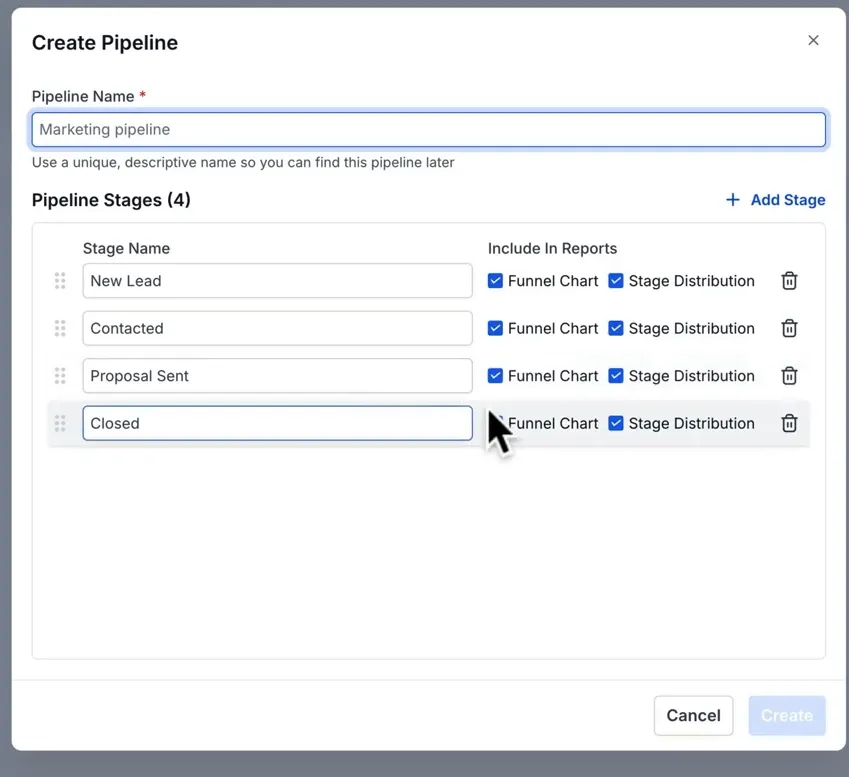
Jobber also has a Sales Pipeline with custom stages. There is an important limitation, though: those custom stages do not trigger automations. Jobber's built-in events can also move an opportunity back into a system-defined stage as the work progresses.
For a straightforward request-to-quote process, Jobber can work well. When the follow-up process needs more flexibility, I vote for HighLevel every day.
Workflow Automation
Automation is one of the strongest reasons I turn to HighLevel for CRM. It gives me tremendous control over what happens next.
The If/Else action in HighLevel leads to different paths. These are based on contact data and available workflow values. I can change the next actions depending on the customer’s behavior. For example, whether they open it, reply, book, or meet another configured condition.
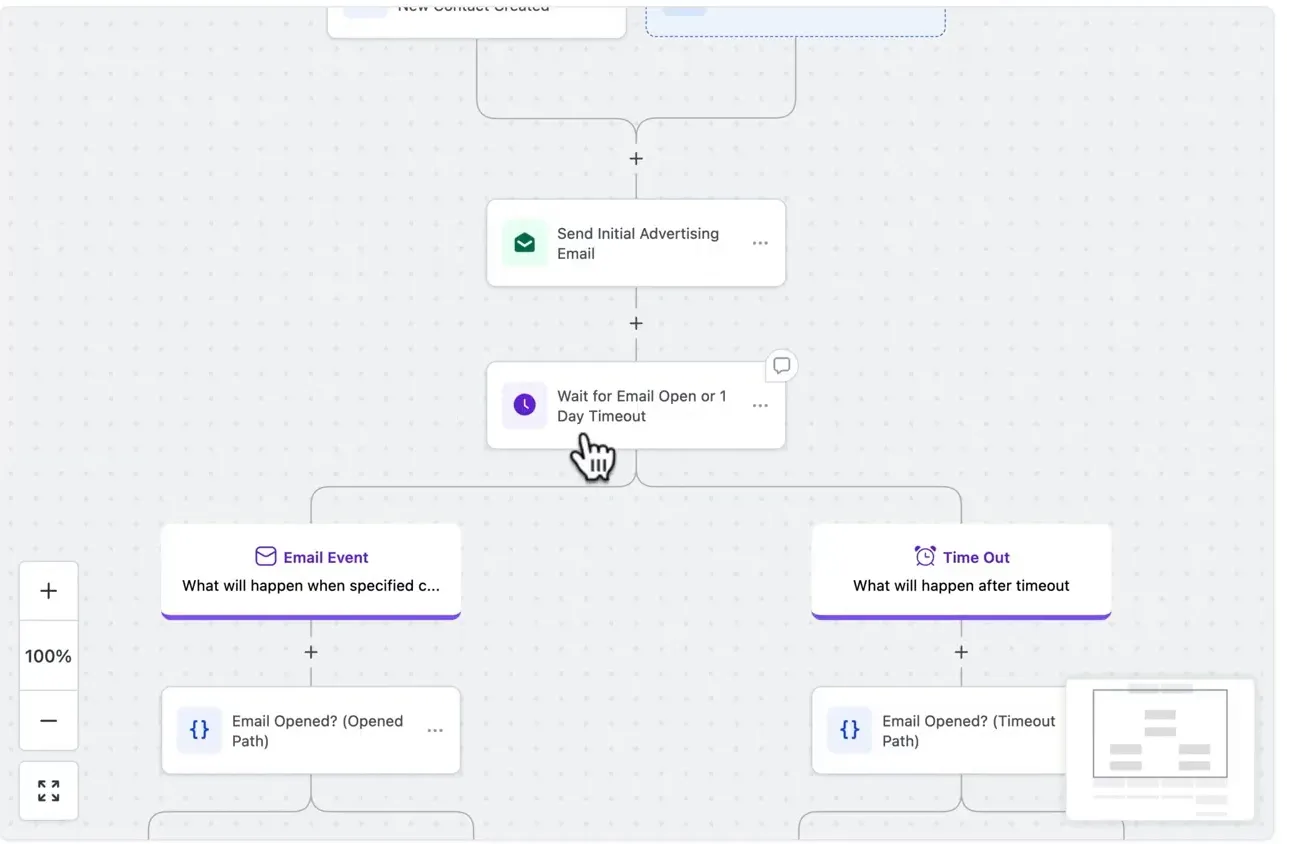
Think about an HVAC company receiving both emergency repair inquiries and installation requests. Those customers need different responses. The emergency inquiry needs immediate attention. The installation lead may need an assessment and a longer follow-up process. I find that kind of control more valuable than a collection of fixed reminders.
Jobber, however, still deserves credit for its automations. I can reduce administrative workload with quote follow-ups, invoice reminders, automatic payments, and custom rules.
Websites, Funnels, and Campaigns
This is another area where HighLevel feels more complete for marketing. Its tools cover websites, funnels, forms, email creation, social planning, and website chat. The business can build the page that attracts an inquiry. Then manage the follow-up on the same platform.
For example, a cleaning company can create a page for a move-out cleaning offer. Then collect the customer's details and connect that inquiry to its booking and follow-up process. That is the kind of marketing setup I prefer.
Jobber has marketing tools as well. Its website and Google Business Profile optimization are included across plans. Marketing Suite adds capabilities such as campaigns, social posting, reviews, and referrals.
I find Jobber more suited to people who want a simple start. HighLevel, on the flip side, is better for people running business for longer and needs more control over their campaigns.
Customer communication
I found customer conversations in HighLevel more organised. It brings supported channels in one place. I can include email, SMS, WhatsApp, and social messages based on the connections configured. This makes my team switch the reply channel quickly- heck, almost instantly!
I find these extremely useful, especially when multiple people handle inquiries.
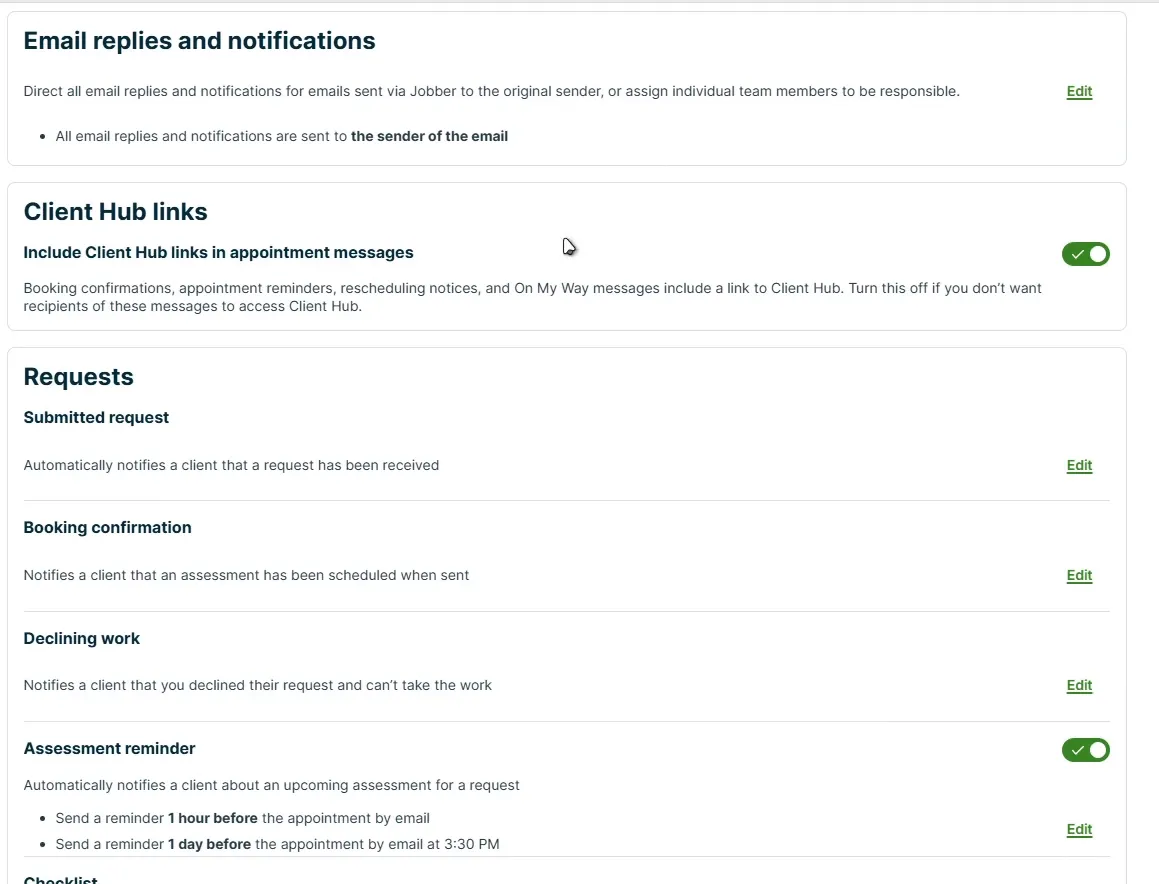
Coming back to Jobber, its communication tools are closely tied to service events. Like booking confirmations, visit reminders, quotes, and invoices. I like it for keeping booked customers informed.
Verdict: HighLevel comes out on top in terms of CRM capability. Its core advantage over Jobber is the freedom to build connected sales. Also, the marketing process is catered to the customer.
HighLevel vs. Jobber for field service: Where Jobber Takes the Lead
Now we are entering the interesting bit. Once a customer books, the office has a different set of problems to solve. Just to give a sneak peek, Jobber is the stronger choice compared to what HighLevel natively offers for field service.
Let me show you why:
Job scheduling and visit management
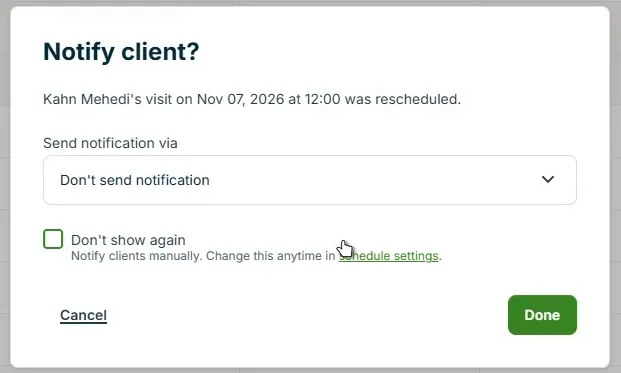
Jobber’s connection between rescheduling and customer communication is a feature I admire. Moving a visit also brings up a prompt asking whether to notify the client.
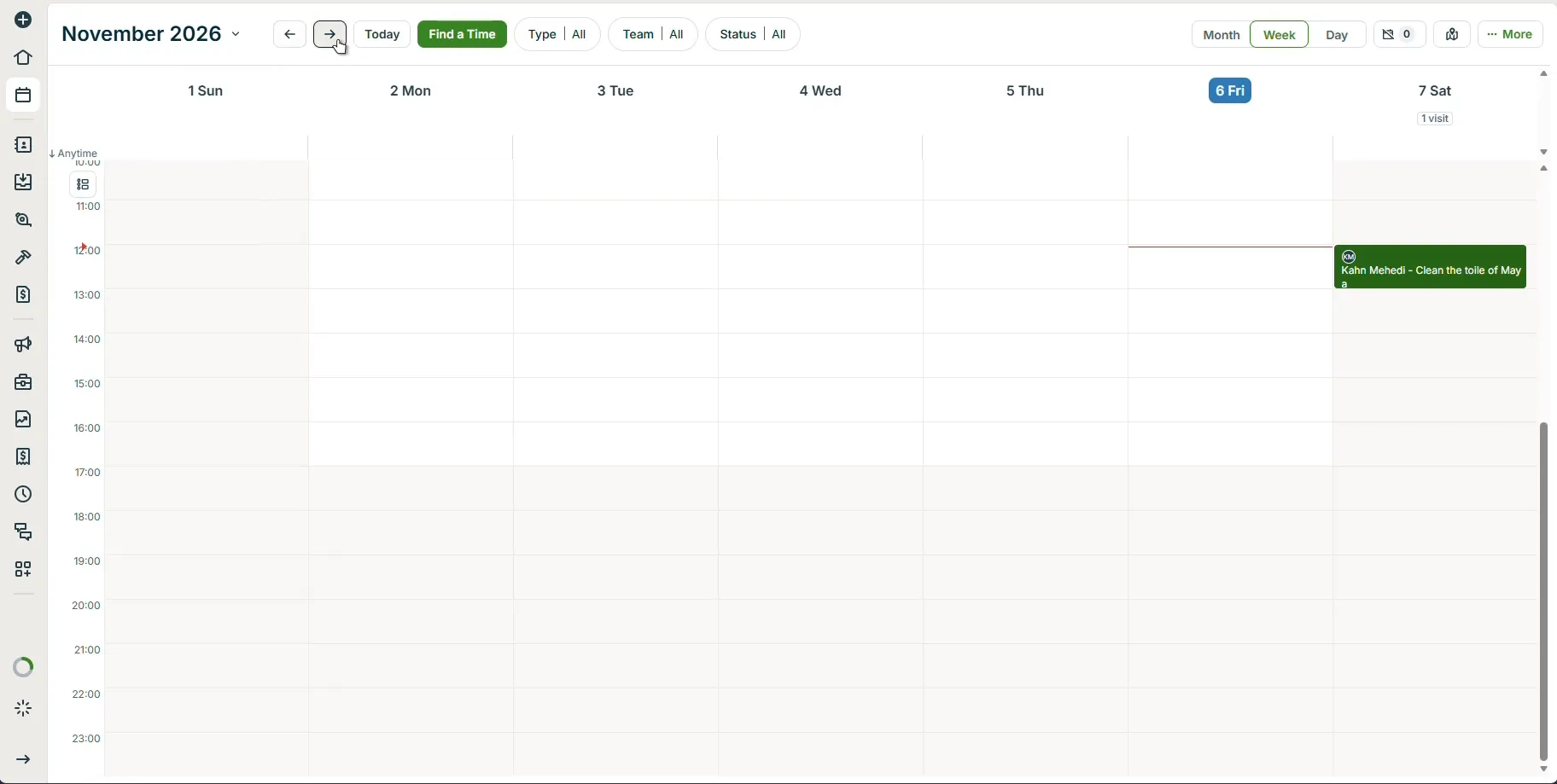
Jobber also keeps scheduled visits connected to the job. Every job comes with instructions, assigned staff, and billing information.
HighLevel's native Field Services, by comparison, has a job-and-visit structure too. A job holds the scope and pricing, with one or more visits scheduled against it.
You see, the real difference is the wider operational setup. Jobber already brings scheduling together with the customer and administrative tools a service business needs.
Quotes, Invoices, and Payments
Jobber naturally fits quotes and billing into the service process. My office maintains the entire service workflow. For example, add products and services, build a quote, organize the job, and prepare the invoice. At the same time, customers approve quotes and pay deposits through the client hub.
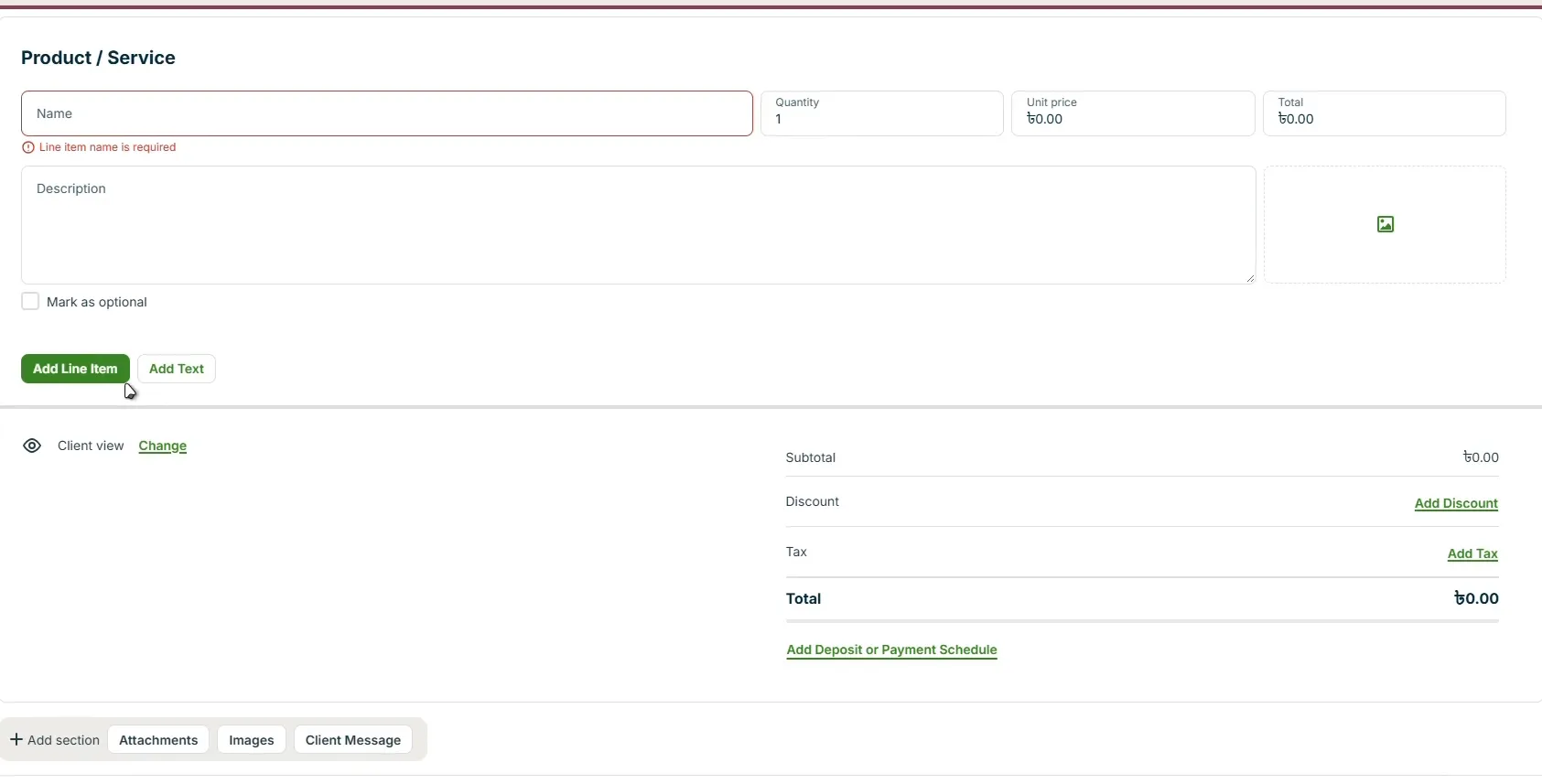
For a small service business, that connection matters. The same work should remain easy to follow from the customer's request through to the bill.
HighLevel's native module also supports requests, estimates, jobs, and invoicing. But Jobber earns my preference because of the tools surrounding that workflow.
Checklists and customer self-service
Jobber's checklist builder gives my office a way to tell technicians what to record. Different response types include text, checkboxes, image uploads, and signatures.
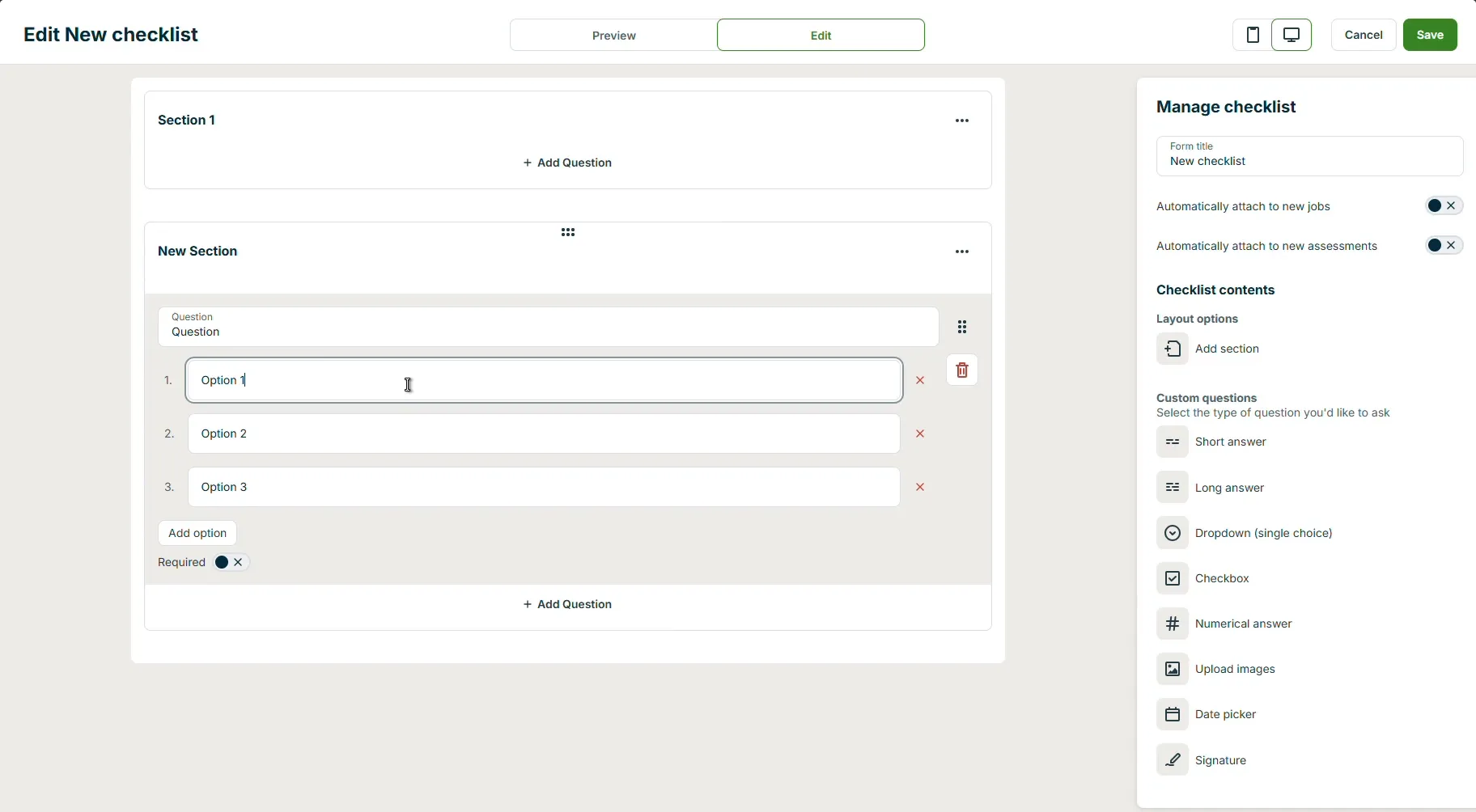
I find it especially useful for consistency. My technicians follow the required steps, and the office has a clearer record of the work.
The client hub is another strength. Customers can request work, approve quotes, review appointments, and pay invoices all through their online portal.
I give that real weight. A customer who can approve a quote without calling the office makes the service process easier for everyone involved.
Gaps in HighLevel's Native Field Service Tools
Although HighLevel brings dedicated field service tools baked right into the platform, it is way behind Jobber. However, the native module includes meaningful capabilities like scheduling, dispatching, and mobile work.
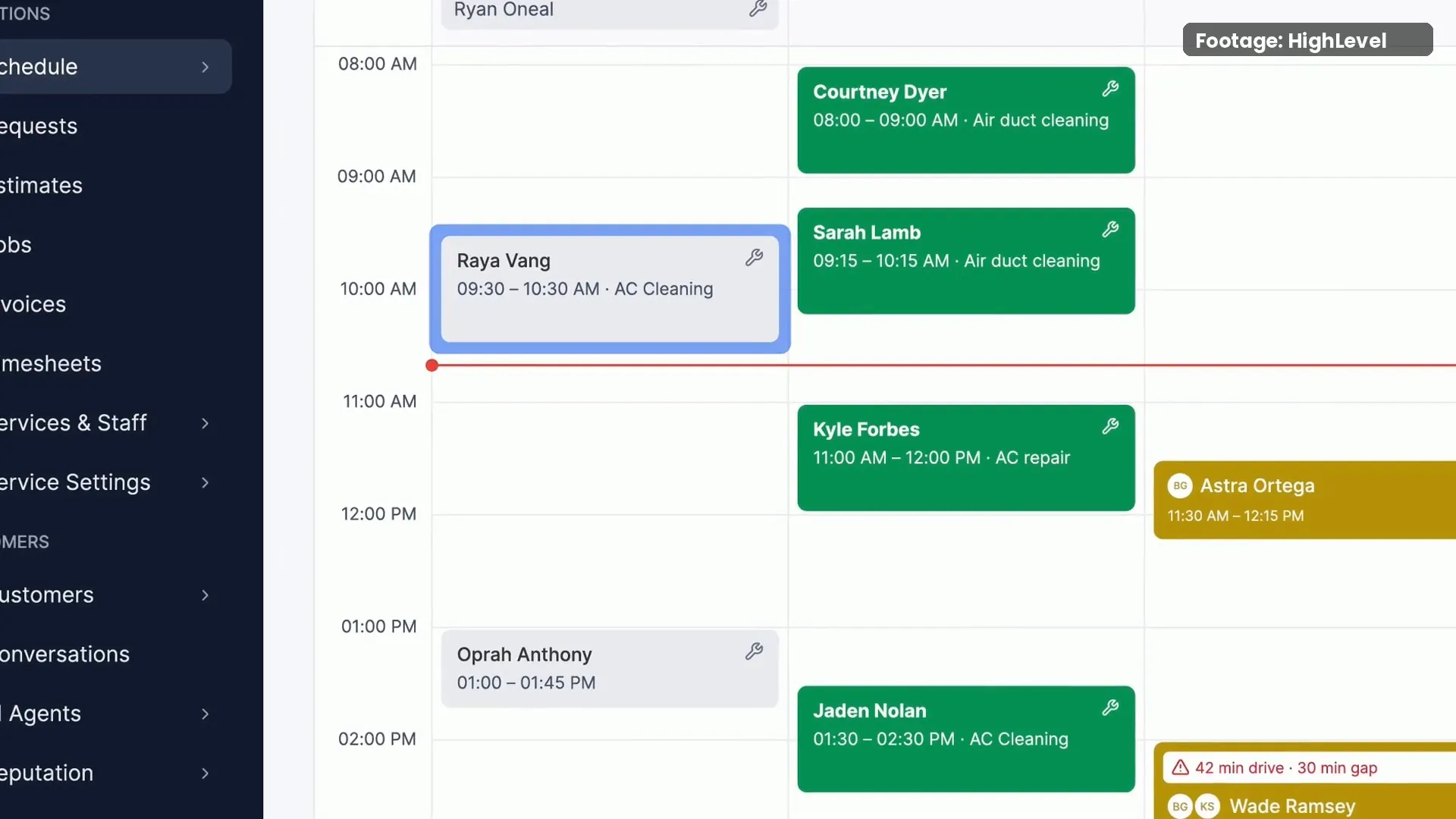
As of writing this article, it’s still in beta. But HighLevel’s roadmap shows they plan to bring:
- Jobs
- Visits
- Requests
- Workflow triggers and actions
- Opportunities integration
- Client portal
Even if they successfully implement those, there is more to the story. I’ll look back at that in a moment. Before that, my
Verdict for field service management: Jobber. It is the more complete standalone option for the service workflow covered here.
FieldTask: The Only Dedicated HighLevel FieldService App that Outperforms Jobber
At this point, HighLevel vs. Jobber can feel like a trade-off. I prefer HighLevel for winning and following up with customers. And I like Jobber for organizing the field service work.
FieldTask just turns that landscape upside down.
First off, it is a field service management app built for the HighLevel ecosystem. It adds scheduling, dispatching, route optimization, GPS time clock, job site photos, and billing tools to the setup. You name any field or home service tool; they have it in the best form possible.
That is the part that gets me excited. Keep HighLevel's marketing and CRM while giving the office and technicians an app designed for fieldwork.
Please note that FieldTask installs through the HighLevel Marketplace. The setup includes choosing supported sync options and inviting the team. Field staff can use its mobile apps.
Appointment and job sync
The first connection I look for is simple: can a booking reach the people doing the work?
Thankfully, FieldTask supports two-way sync between HighLevel appointments and FieldTask jobs. With the relevant sync enabled, appointment details, the assignee, and the location can come into FieldTask. Jobs created in FieldTask can also appear on the corresponding HighLevel calendar.
This gives my office a practical link between booking the customer and assigning the work. My team does not need to rebuild the same appointment as a separate job when that sync is configured.
Dispatching and proximity assignment
I love FieldTask's map-based approach to dispatching. Team members and work can be viewed geographically, with job information available beside the map.
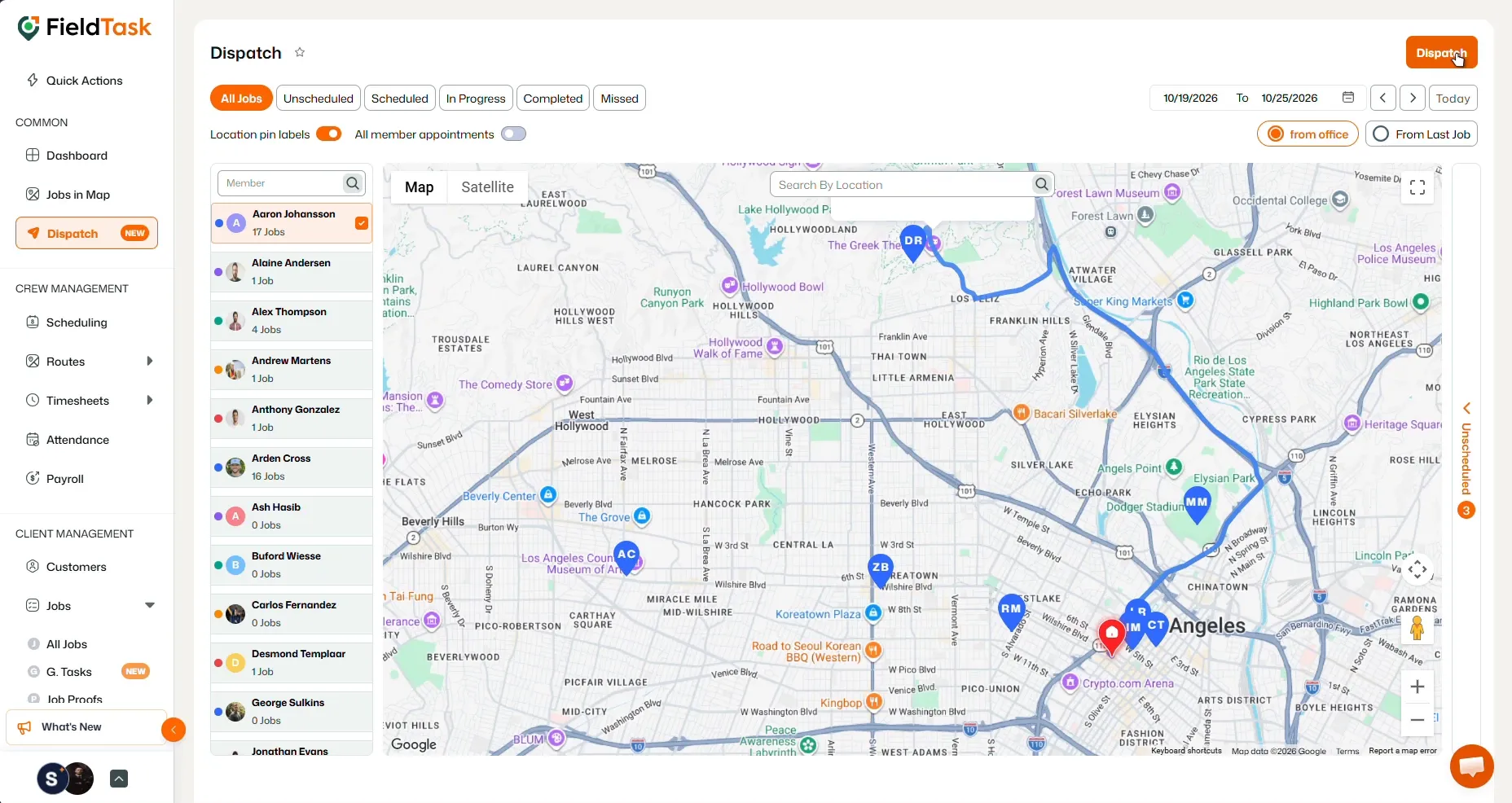
Its Proximity feature helps answer a useful question: who is close to this job?
And guess what?
FieldTask can rank potential assignees by distance from the location. The dispatcher can use that information during job creation or from the Proximity module.
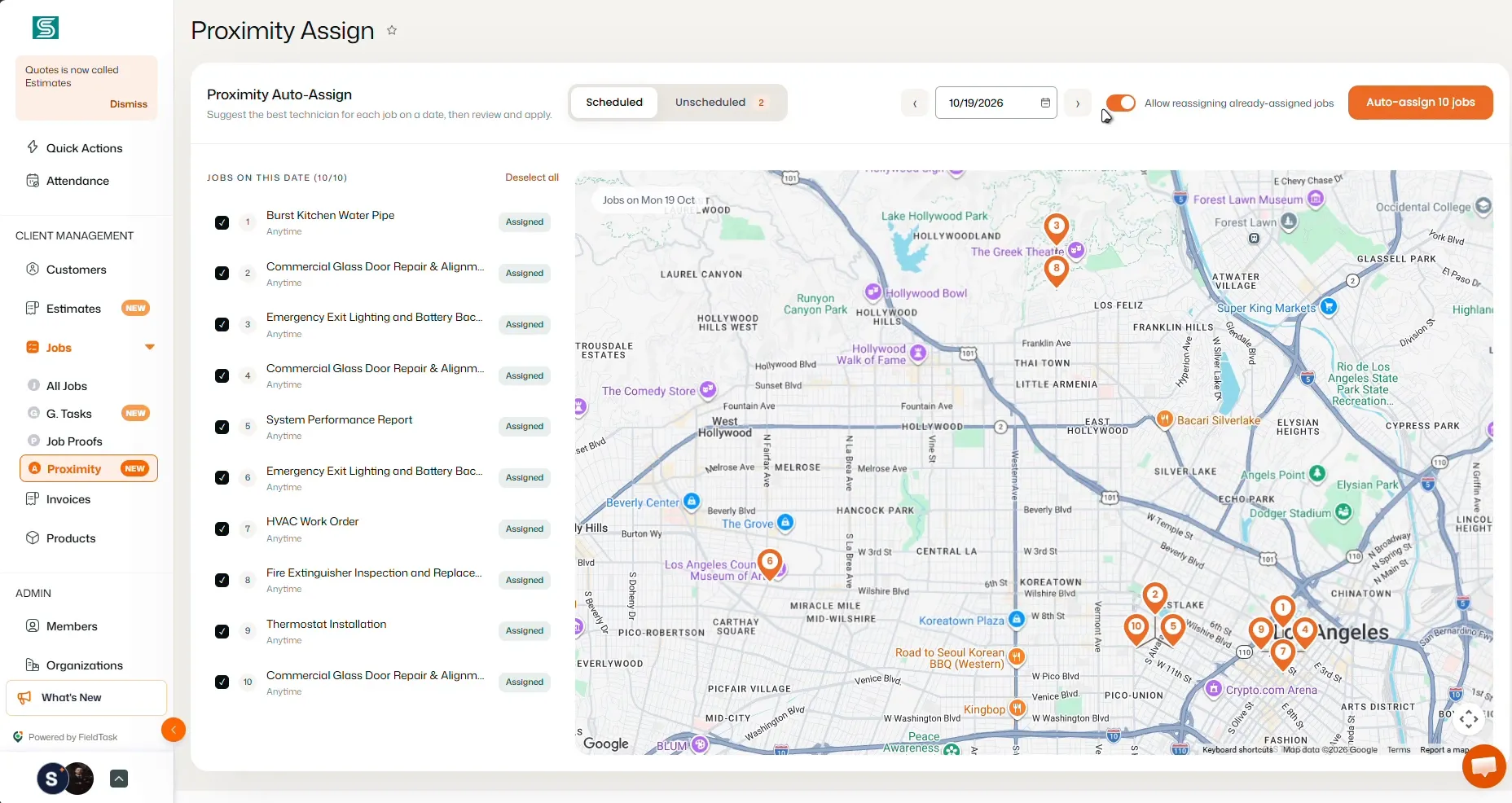
In an urgent plumbing call, that was a much better starting point than guessing who might be nearby. The dispatcher could check the distance alongside availability. Also, the requirements of the job before assigning it.
Scheduling and route optimization
The member-based scheduling board is another feature that impressed me. Assigned jobs sit on the schedule, while unscheduled work remains visible in a separate list.
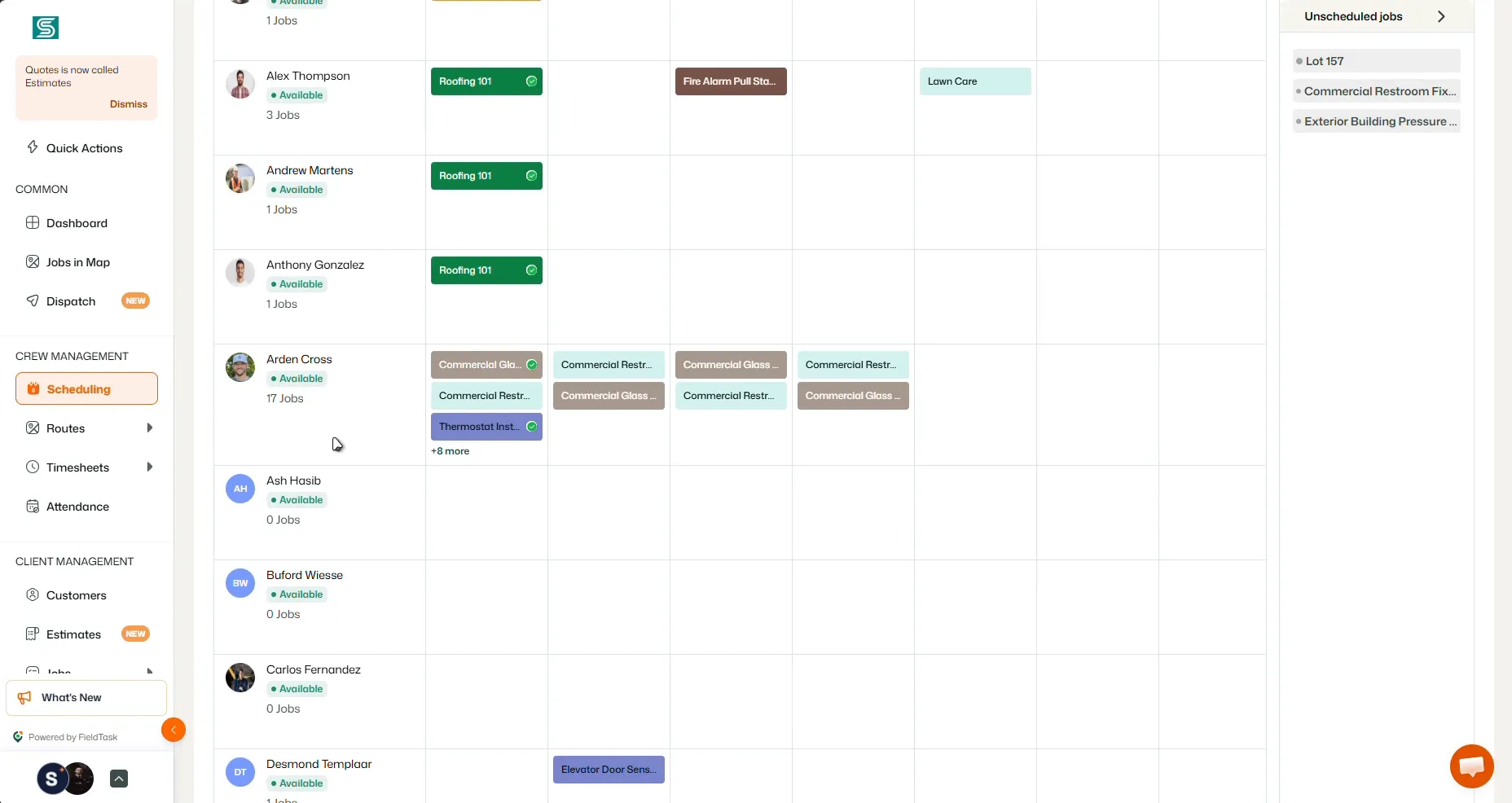
That makes the next task clear: find work that still needs a place in the day and assign it to the right person.
Having said that, Route Optimization handles the travel side. The office chooses an assignee and jobs, sets start and end points, and creates a route that can be viewed on a map.
Just so you know, scheduling and routing solve different problems, and having both matters to me. A technician needs a workable schedule and a sensible order for travelling between customers.
GPS Tracking, Attendance, and Timesheets
FieldTask brings together live location, last detected position, attendance, and timesheet views. I can see my technicians live location, their clock in clock out times and how long they’ve worked.
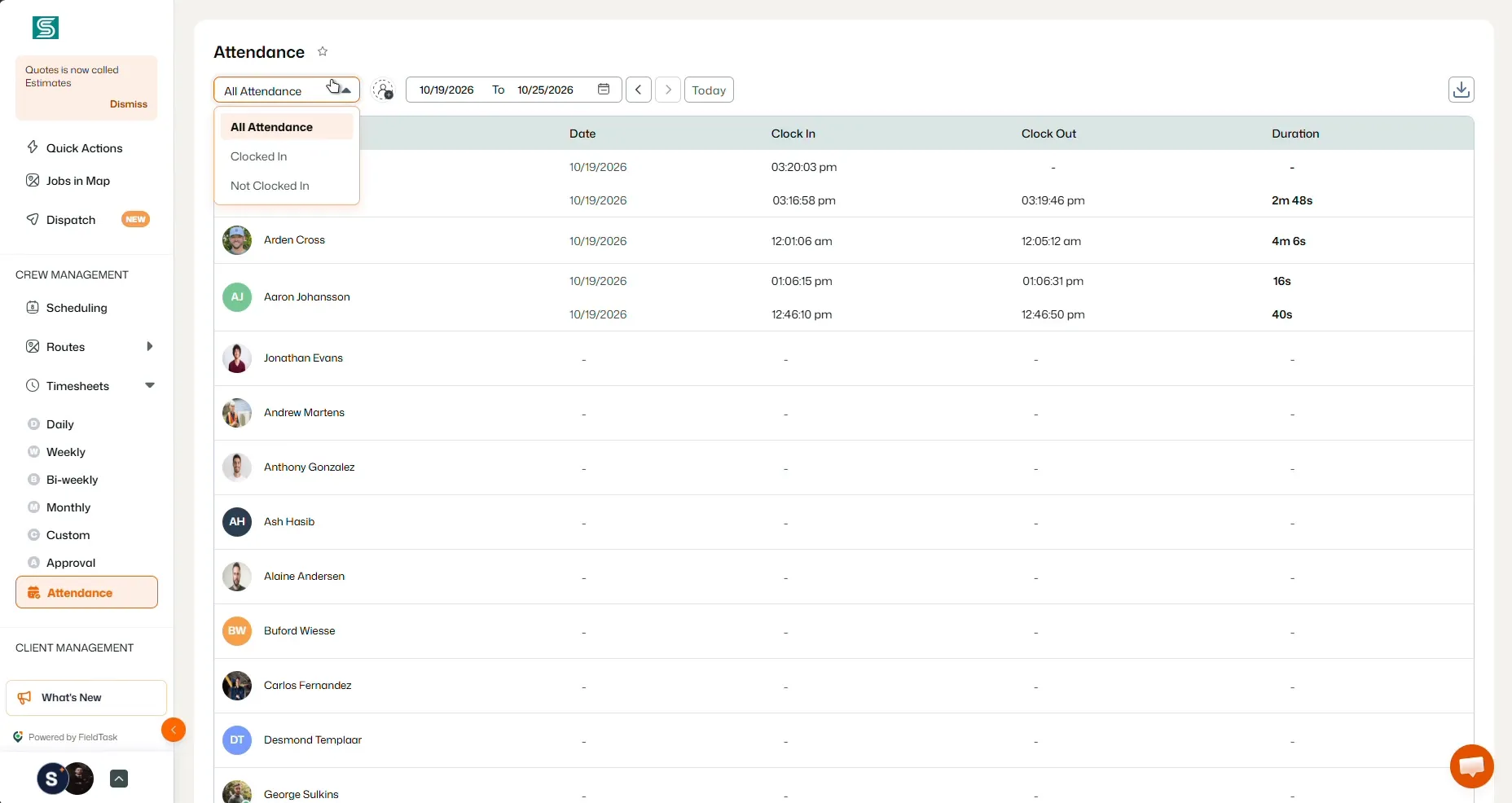
These are basic functionalities but work every time. And that’s what matters the most to me. It has become a system which I can count on every single time.
There is also an optional geofenced check-in rule. When enabled for an employee, it requires them to be within the job's designated location before checking in. Check-in starts the work-time tracking.
The mobile permissions and check-in settings need to be configured correctly for those location features to work. For an office managing several technicians, this adds useful context to the schedule and work records.
Checklists, Job Proof, and Approvals
Marking a job complete tells the office its status. The supporting documentation tells the office what was done.
FieldTask also lets the business attach checklists and require jobsite photos for individual line items. Its Job Proofs area provides a place to review submitted work through an approval process.
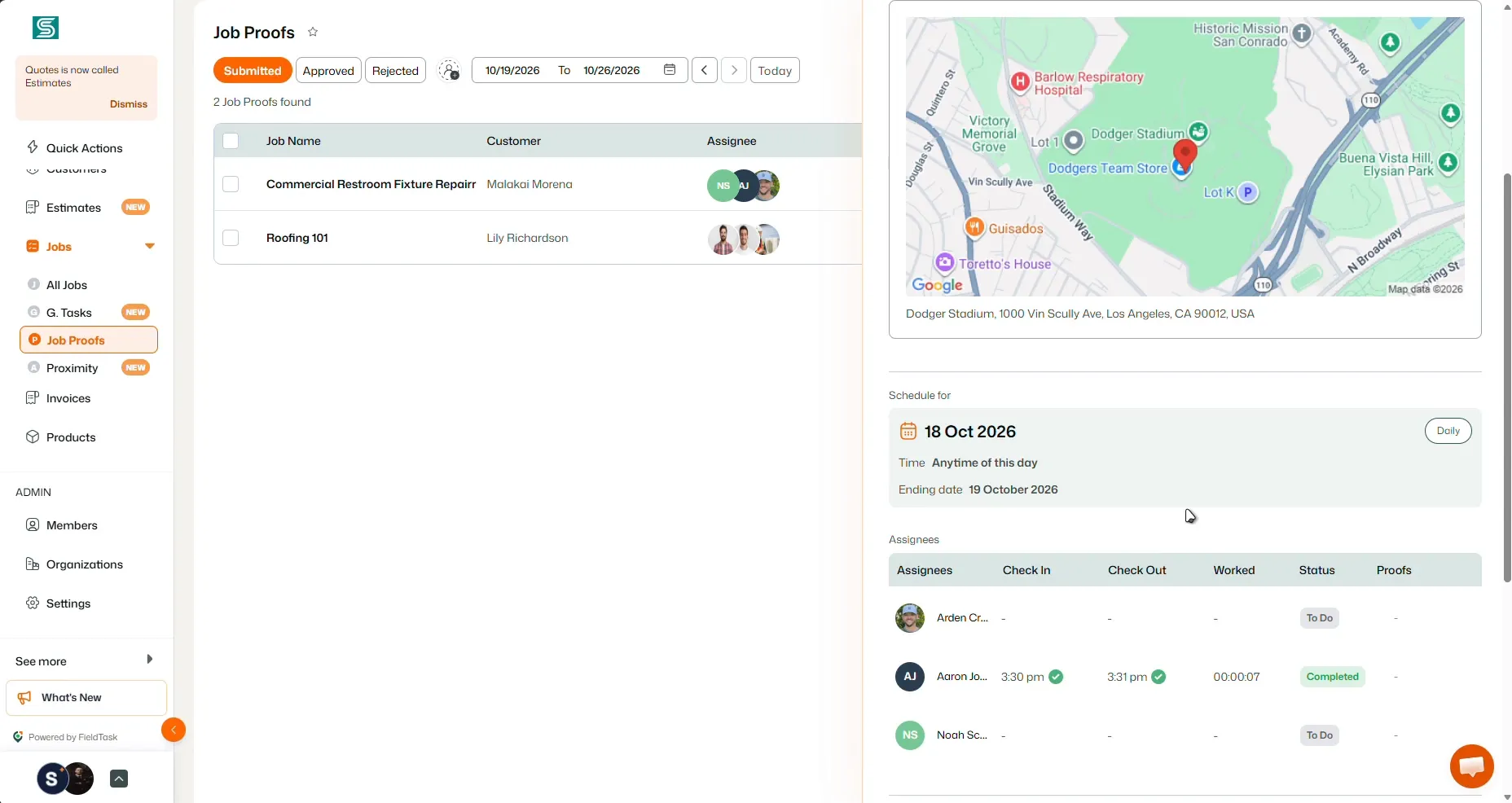
I like that level of detail for services where the office needs to check specific tasks before approving the work. A cleaning job, for example, can have a defined checklist and evidence requirements for the relevant items.
Estimates and Invoice sync
FieldTask also includes estimate and invoice tools, with status views that help the office keep track of them.
The invoice connection is particularly useful for a business already using HighLevel. I can easily sync invoices to HighLevel that are created in FieldTask. Also, updates made in either platform can be reflected in the other.
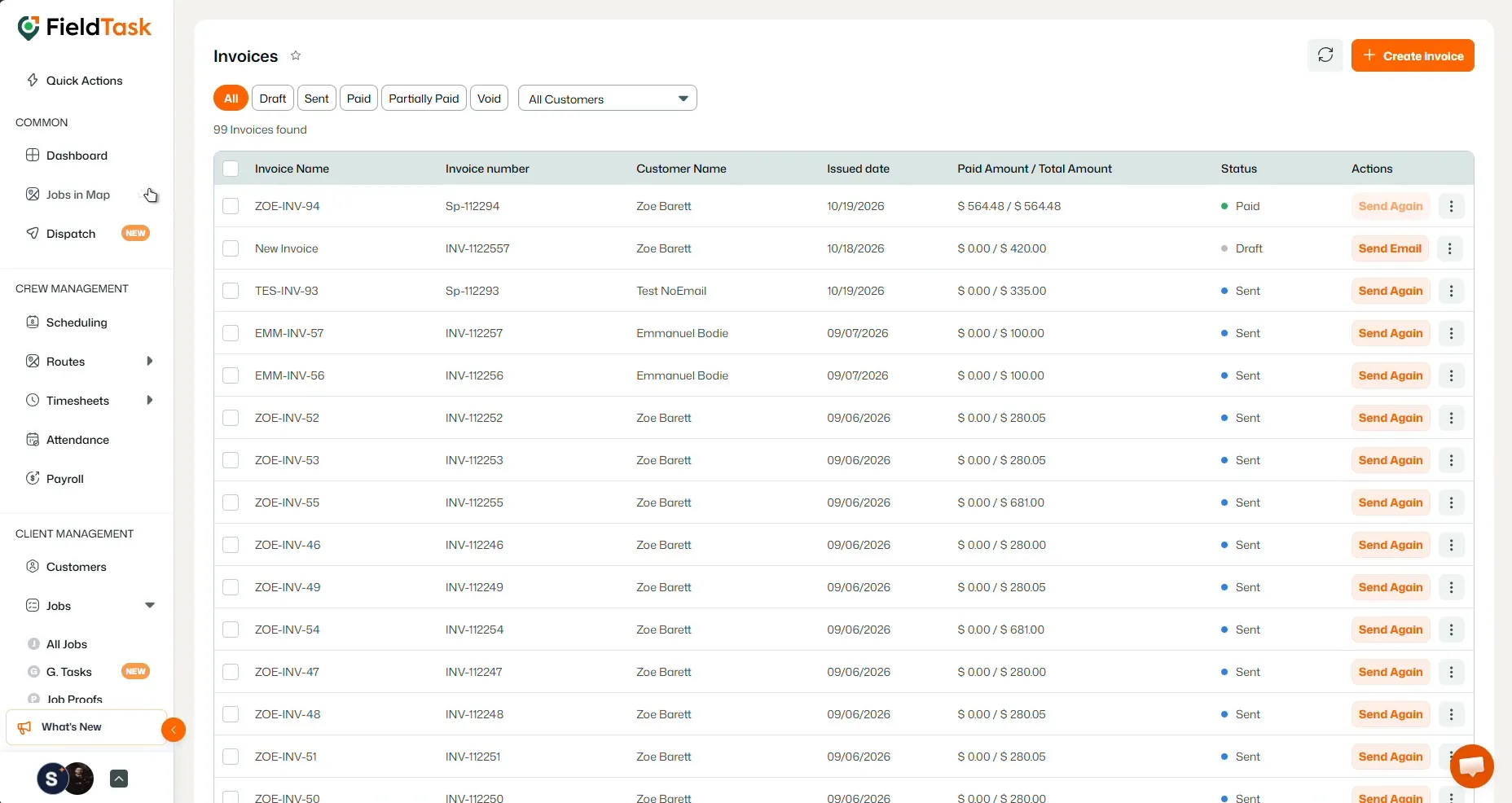
That keeps billing connected to the wider customer relationship while the team handles the fieldwork in FieldTask.
Why HighLevel with FieldTask is My Overall Pick
The combination makes the most sense when I follow one service inquiry from start to finish.
Take a homeowner looking for a deep clean. HighLevel can handle the page, inquiry, sales pipeline, and configured follow-up. Once the customer books on a connected calendar, FieldTask's appointment sync can bring that booking into the field workflow.
From there, the office can assign the job, organize the route, and give the technician the location and instructions. The technician records work time and completes the required documentation. The office can review the work and manage an invoice connected back to HighLevel.
That is the advantage I care about. The business gets a strong CRM and a dedicated way to manage the work it sells.
For a service company that wants control over marketing and daily operations, HighLevel plus FieldTask is a stronger fit than Jobber alone.
Jobber remains a good choice for an owner who likes its service workflow and client hub. Businesses with specific accounting, job-costing, or trade requirements should check those features carefully before moving.
But for a business growing around HighLevel, FieldTask fills the operational gap that would otherwise push the team toward another service platform.
HighLevel vs Jobber Pricing Comparison: What Does the Full Setup Cost?
The starting price deserves a closer look, especially for a small team.
FYI, HighLevel's native industry offering sits at a much higher subscription price than Starter. FieldTask, however, provides a way to add dedicated field operations while keeping the cost lower than a HighLevel Founder or Jobber’s Plus subscription plan.
Jobber Plus Pricing for 2-5 Users
Jobber Plus supports a team of up to five users at these published rates:
| Billing Option | Monthly Price |
|---|---|
Billed annually | $399 |
Monthly payments with a one-year commitment | $439 |
Monthly with no commitment | $499 |
The annual option works out to $4,788 paid yearly, before applicable taxes and other charges. Jobber also offers lower solo-user pricing, including its Core plan.
Plus includes practical tools such as automated reminders, quote and invoice follow-ups, checklists, time and expense tracking, and QuickBooks Online sync. Basically, it’s comparable to the HighLevel + FieldTask setup.
You may think of a bias, as I didn’t mention the lower plans of Jobber. The reality is that the features you get with FieldTask are only comparable to the Plus plan. Hence, this is the one highlighted here.
HighLevel's Native Field Service Plan
HighLevel Starter costs $97 per month. But it does not offer any field service tools; Not even the $297 Unlimited plan. Only the Founder plan offers these tools. And it costs a whopping $497 per month.
At this price, a HighLevel user can enjoy field service tools such as home-service job creation, field management, and geographic routing. But for my 5-person team, the value of this plan looks extremely poor. You’ll know in a bit why.
HighLevel Starter plus FieldTask (The Best Option)
I was rather happy to see that FieldTask works with the HighLevel Starter $97 plan. The only thing I do is, I’ve installed the FieldTask app marketplace. To tell you the truth, for a fraction of the price, I can enjoy identical field service features that would otherwise be available and would cost me $400 on Jobber.
Interestingly, sometimes FieldTask gives me exclusive tools without any extra hidden charges. For example, the Proximity auto-assign or Jobs in map feature.
Not to mention, FieldTask replaces apps like CompanyCam as well. It will give you options to take jobsite photos within the app, on the same subscription (no added fees required).
So my choice is simple: just get a $97 HighLevel Starter plan and install FieldTask. You save hundreds of dollars yet enjoy the most advanced home/field service tools.
The final savings, however, may vary on the FieldTask package and provider's offer, since FieldTask is billed separately.
Just for the record, FieldTask packages are based on team size, and its website directs buyers to the HighLevel Marketplace for current pricing. Request the package that covers everyone who needs access.
HighLevel vs Jobber: What is the Best Choice For You?
Clearly, HighLevel with FieldTask is my go-to choice for anyone with a service business or running an agency. This recommendation does not come from just a random thought. The value and experience this setup provides is uncontested right now.
Even after that, if you want a dedicated service-management platform and its built-in workflow covers the business well, you might find Jobber useful.
FAQs about Jobber vs HighLevel
Is HighLevel better than Jobber for CRM?
HighLevel is my choice for flexible lead management, sales pipelines, funnels, and follow-up automation. Jobber's CRM is useful for keeping clients, properties, and service records organized.
Is Jobber better than HighLevel for field service management?
Compared with HighLevel's current native Field Services beta, I prefer Jobber for standalone service operations. Adding FieldTask gives HighLevel users a separate route to dedicated field service management.
Does HighLevel have its own field service software?
Yes. Its native Field Services module is in private beta and supports requests, estimates, jobs, visits, scheduling, routing, invoicing, and mobile work. Availability and current limitations matter when choosing it for a service team.
Can I use FieldTask with HighLevel Starter?
Yes. FieldTask works with the $97-per-month HighLevel Starter plan as a separately billed Marketplace app. It does not require Founder to add its field service tools.
Is HighLevel plus FieldTask cheaper than Jobber?
The total depends on your FieldTask offer and billing terms. Compare $97 per month plus the FieldTask subscription with the Jobber plan and add-ons your team needs. For five-user Connect, the published rate is $149 per month billed annually or $199 per month without a commitment.
Does FieldTask replace HighLevel's CRM?
FieldTask adds dedicated field operations to the HighLevel setup. HighLevel continues to handle CRM and marketing, with supported records shared through the configured sync.
Bring More of Your Service Business into One Connected Setup
My choice comes down to the work a service business needs to manage every day.
HighLevel gives me the CRM and marketing control I prefer. FieldTask adds the tools needed to schedule technicians, dispatch jobs, organize routes, track work, and review completion.
Together, they make a compelling setup for a business that wants to win the customer and keep the fieldwork connected afterward.
Book a FieldTask demo to see how the booking, dispatch, and job-completion process fits your team, and get a quote for your business.