The HighLevel Home Service Business Management Software
Manage dispatch, route plan, techs, quotes, invoices, and more in GHL, the only dedicated field service app for HighLevel home service businesses and contractors.

Learn how to use the FieldTask Mobile App Dashboard and understand the information available at a glance.
When you log into the FieldTask Mobile App, the Dashboard gives you an overview of your organization's current jobs, team activity, financial information, and recent performance.
The information shown on the Dashboard can vary depending on your role and the data available to your Organization.
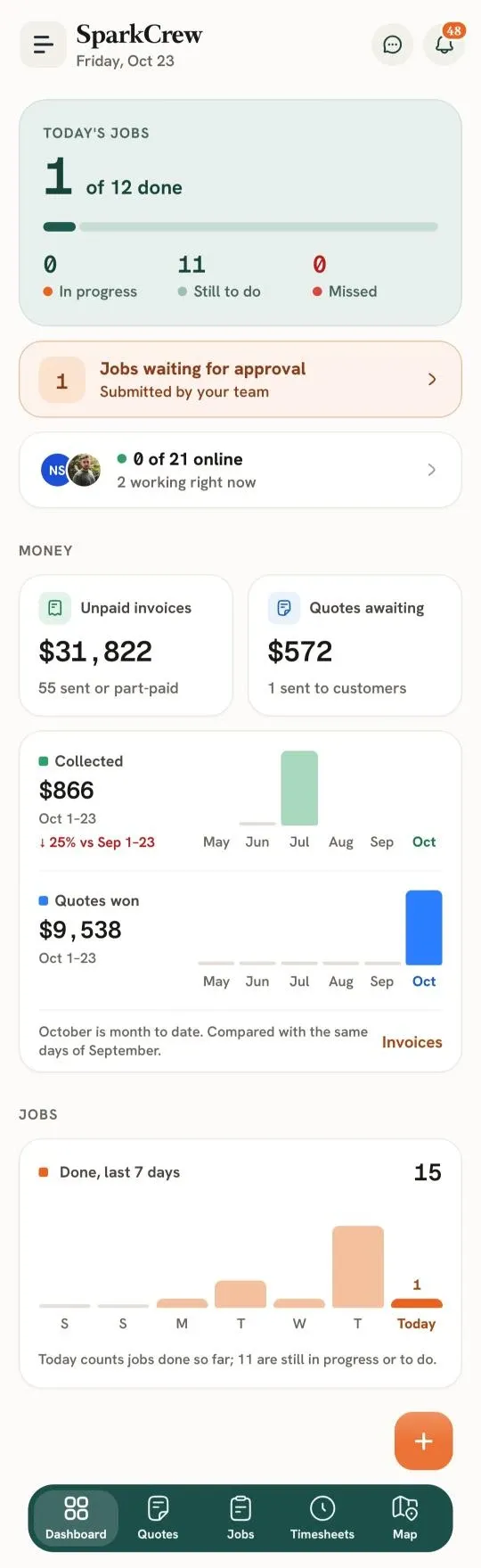
The Today's Jobs card provides a quick overview of the jobs scheduled for the current day.
It shows:
The progress bar provides a visual representation of how many of the day's jobs have been completed.
The Jobs waiting for approval card shows the number of jobs submitted by your team that are waiting for approval.
Tap this card to access the relevant job approval information.
The team status card provides an overview of your organization's Members, including:
You can tap the card to access more information about your team's current status.
The Money section provides an overview of your Organization's financial activity.
The Unpaid invoices card shows the amount currently unpaid, along with the number of invoices that have been sent or are partially paid.
Tap the Unpaid invoices card to go directly to the Invoices page, where you can view and manage your invoices.
The Quotes awaiting card shows the value of Quotes that are currently awaiting a response, along with the number of Quotes sent to customers.
Tap the Quotes awaiting card to go directly to the Quotes page, where you can view and manage your Quotes.
The Collected section provides an overview of the amount collected during the current period.
It also includes a comparison with the corresponding period from the previous month.
The Quotes won section shows the value of Quotes won during the current period.
The chart provides a visual comparison across the displayed months.
The Jobs section provides a view of recently completed jobs.
This card shows the number of jobs completed over the last seven days, including today's completed jobs.
The chart provides a day-by-day visual representation of completed jobs, making it easier to see how job completion has changed throughout the week.
The Dashboard also indicates how many jobs remain In Progress or Still to Do for the current day.
Overall, the Mobile App Dashboard is designed to give you a quick view of today's work, team activity, financial information, Quotes, and recent job performance without needing to navigate through individual sections of FieldTask.
Manage dispatch, route plan, techs, quotes, invoices, and more in GHL, the only dedicated field service app for HighLevel home service businesses and contractors.
The complete FieldTask sitemap: quick links to all pages.
Learn how FieldTask supports HIPAA compliance for home health and field service teams—encryption, BAAs, access controls, and audit logging.